Dashboard gives you an instant snapshot of all activities, statuses and To-Do lists across clients and your practice.
You can view key aspects of your practice, from every task being undertaken by staff to what clients are doing.
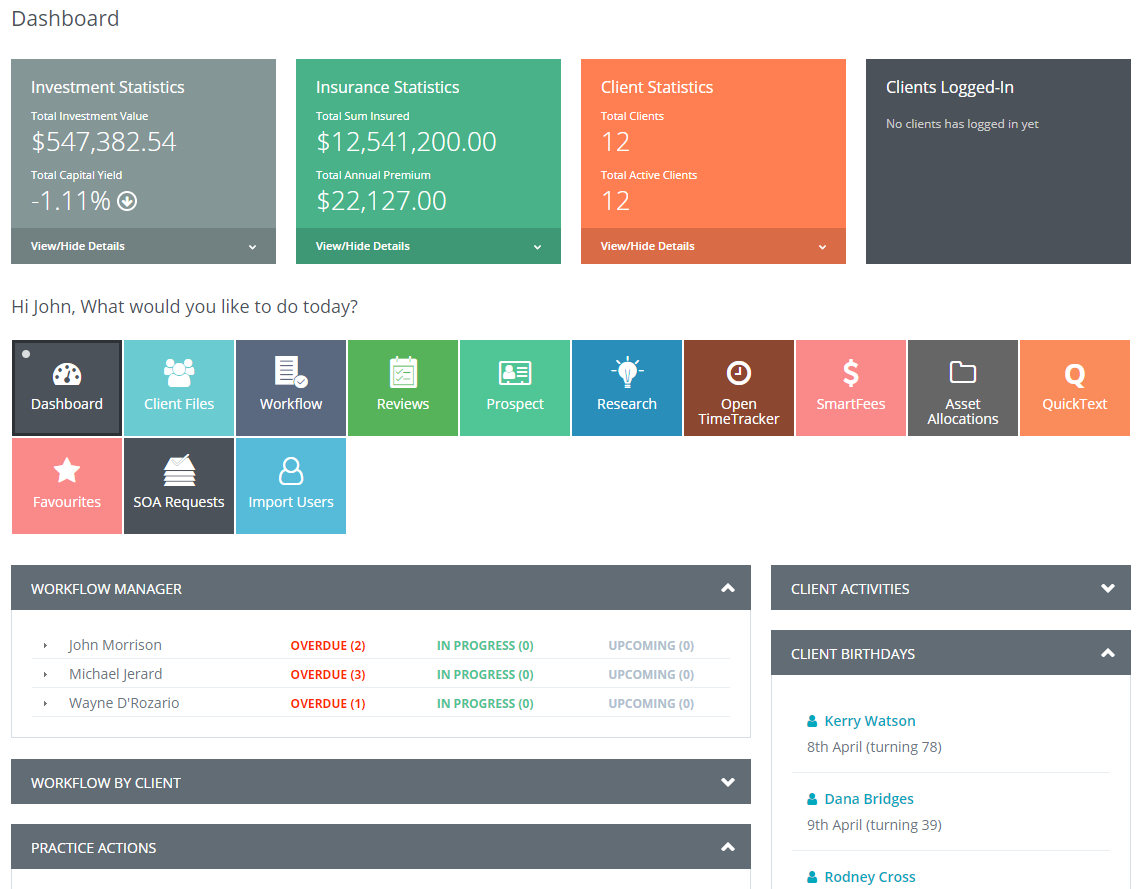
You can instantly view;
- both AR and staff workflows
- important anniversaries of your clients
- view if your clients have made any changes to their file by remote access (optional)
- View a complete status breakdown of your FUM across all clients
- View a complete status breakdown of your insurance position of all clients
- View a complete status breakdown of your clients position for compliance
- add/edit new client information
In addition to the above, you will be alerted to any changes or concerns across;
- model portfolios for clients
- missing data-sets for compliance of clients based on SmartCheck configuaration
- check Practice fees to date collected and pending
- check, view, edit pending reviews
- check prospect levels per AR
- edit and add QuickTEXT information for sharing across the practice or AFSL
- edit, add and view research notes, documents and online links
Drill down by module to explore;
- insurance Provider by type, volume and client
- fund provider by type, volume and client
- practice overview by modules/apps in use
- view full market summary of investment movements
You can also perform the following;
- search for and perform lost Super funds direct with the ATO website
- manage CARs, ARs and Support staff (if elected)
- manage reports and promotions (if elected)
- manage Opt-In requirements and dispatch notices
0 Comments